

Modeling your process: Flows, Trails, and Templates
Every process you want to track in Kosli starts with a Flow. A Flow models a repeatable process: a CI pipeline, a Terraform workflow, an onboarding procedure. It is the container for everything that happens within that process. Each time the process runs, Kosli creates a Trail. A Trail represents one execution of a Flow: one CI build, one pull request, one infrastructure change. You choose the identifier (a git commit SHA, a PR number, a ticket ID) so that trails map naturally to your domain. The reason Kosli uses user-chosen identifiers rather than auto-generated IDs is that trails should map to concepts your team already works with, not introduce an opaque abstraction. A Flow Template defines what “compliant” means for a given Flow. It lists the artifacts and attestations that every Trail must contain before Kosli considers it complete. This is how Kosli enforces build and release controls: if a required attestation is missing, the Trail is non-compliant.Recording evidence: Artifacts and Attestations
When your CI pipeline produces a binary, container image, or any other deliverable, you report it to Kosli as an Artifact. Kosli identifies each artifact by its SHA256 fingerprint rather than by name or tag. The reason for this design choice is that names and tags are mutable (alatest tag can point to different images over time), while a cryptographic fingerprint is immutable. This creates a tamper-proof reference that links the artifact’s origin in a Trail to its runtime presence in an Environment.
An Attestation records that a specific control was executed and captures its result. When your pipeline runs a Snyk scan, that scan result becomes an attestation on the artifact or trail. When a pull request is reviewed, that review becomes an attestation. Attestations are the evidence that your controls actually ran.
Kosli provides built-in attestation types for common controls (Snyk, JUnit, SonarCloud, pull requests, approvals) and supports custom types with jq querying for compliance evaluation. You can also create generic attestations for controls that do not require automated evaluation.
Attestations can carry attached evidence files (test reports, scan output, approval records). Kosli stores these files in the Evidence Vault, making them retrievable on demand for audits or investigations.
Monitoring runtime: Environments, Snapshots, and Policies
Kosli tracks what is running in your production (and non-production) systems through Environments. The reason Environments are modeled separately from Flows is that what you build and what you run are fundamentally different concerns that need independent tracking. Each physical or virtual runtime you want to monitor gets its own Kosli Environment: a Kubernetes cluster, an ECS service, a Lambda function, an S3 bucket, or a server directory. Kosli supports periodic Environment Snapshots that capture the artifacts running at a point in time. For each artifact in a snapshot, Kosli traces it back to the Flow and Trail that produced it, creating a direct link between what was built and what is running. This is how Kosli implements runtime controls like drift detection and shadow change identification. An Environment Policy defines compliance requirements for what may run in an environment. If an artifact appears in a snapshot that does not satisfy the policy, Kosli flags it as non-compliant. Third-party artifacts that you trust but did not build yourself can be allowlisted.Audit readiness
A Trail collects all the attestations and artifacts for a single execution of your process. You can download an Audit Package for any Trail, Artifact, or individual Attestation to get a tar file containing the metadata and attached evidence files. This is your on-demand compliance record, ready for auditors or internal investigations.Organizations
A Kosli Organization is the account that owns all of these resources: Flows, Environments, Policies, and the evidence they contain. Organizations provide the access control boundary that determines who can view and modify compliance data. This matters because many of the risks Kosli addresses (insider threat, unauthorized deployment) depend on controlling who has access to what. Most teams work within a shared organization that maps to their company. Members are invited with specific roles that control what they can see and do.How the pieces connect
The diagram below shows how these building blocks relate to each other.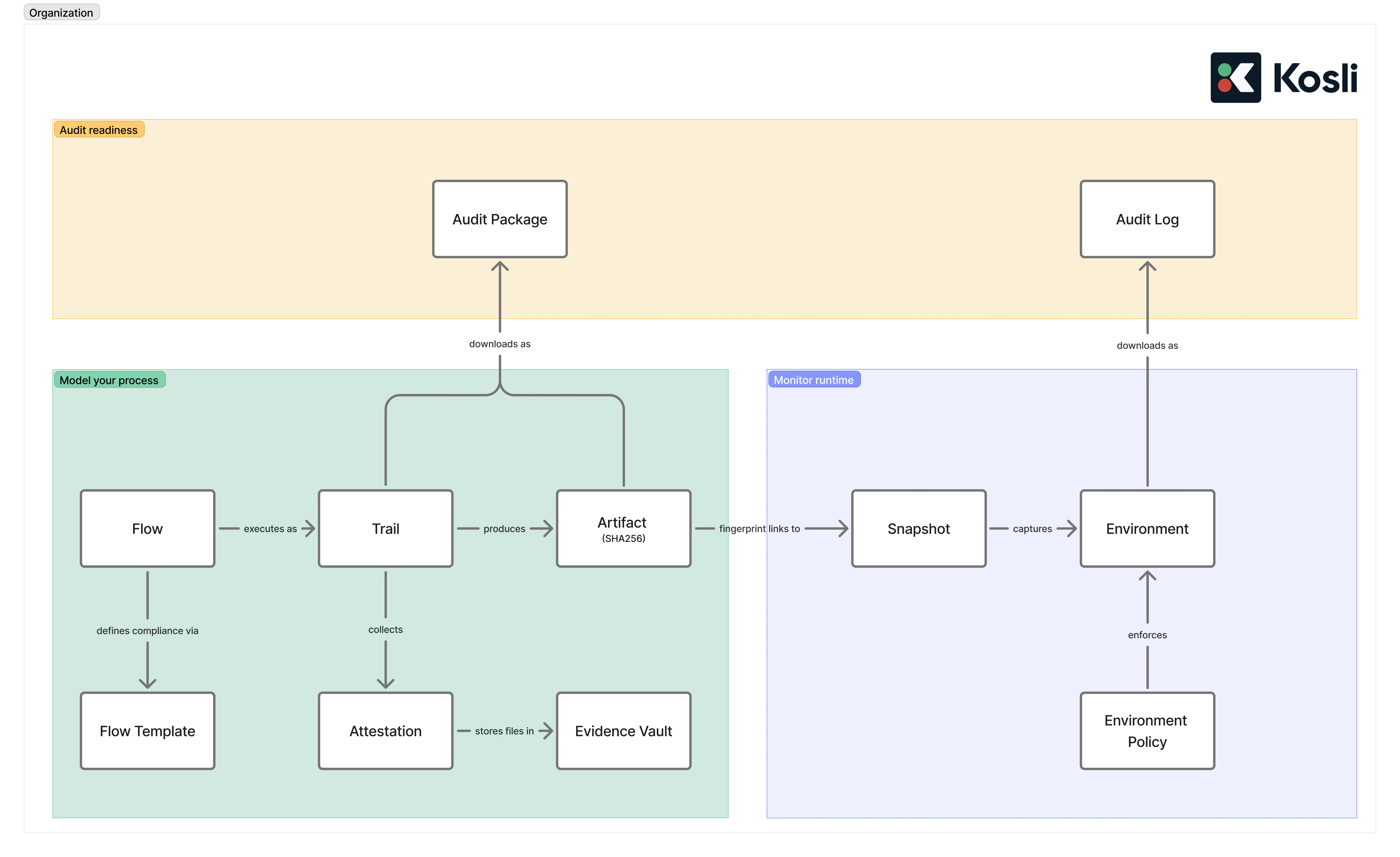
Get started
Create a Flow
Set up your first Flow and Trail.
Report Artifacts
Report artifacts and create attestations.
Report Environments
Monitor runtime environments and define policies.
Glossary
Quick-reference definitions of every Kosli term.
Risks
The SDLC risks these concepts are designed to address.
Controls
How controls map to Kosli building blocks.
Learning Labs
Five hands-on labs covering the full Kosli workflow.